Ember Knights Cheat Codes – PC

Select your platform and your letter

Ember Knights Cheat Codes

Cheat codes for Ember Knights on PC, listed below with how to enter them. Updated April 30, 2022 · 3,045 downloads.

PC
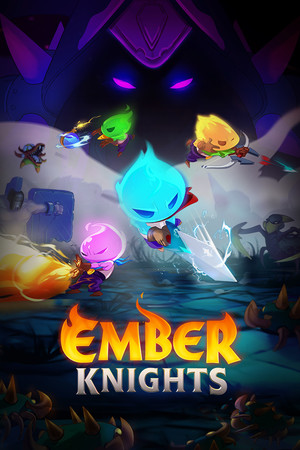
Ember Knights cover
Advertisement
Cheat codes only

This article contains cheat codes only. No file to download.

Information
  • Author: DAV
  • Downloads: 3,045
  • Updated:

Cheat Codes

Cheat Codes:
------------
Submitted by: David K.

How to Copy Save Files for Co-Op:
---------------------------------
Written by Stale Pasta

For Ember Knights players, this guide will show you how to copy your friends
save file to get around the fact that only the host gets progress in
multiplayer.

-=Where to find it, and how to copy=-
The host needs to follow this directory found below.

Either go to...

Drive->Program Files->Steam->Steamapps->Common->Emberknights->EmberKnights 64 Data
->Save Data

Or simply copy and paste the below into your directory...

\Program Files (x86)\Steam\steamapps\common\EmberKnights\EmberKnights_64_Data\SaveData

Once in the save data folder copy "rog.dat" and send it to the person who wants a copy
of that save file. Discord is the easiest way, but you can send it any way you want.
Note the Syntax above might be a bit different depending on your operating system,
but the general path should roughly be the same.

============================================

From this point on this is all from the perspective of the guest.
The host does not need to do any of this.

Once the guest has received the "rog.dat" file, make sure the game is closed and
have the guest paste it into their save data folder, replacing the old one if there
is one.

Next the guest needs to go to their library -> right click on Ember Knights -> Properties
-> Turn off Steam Sync for Ember Knights. This will stop the game from trying to load
the guests old save file in the cloud when you boot the game back up.

The guest should now load up the game. Check to make sure you have any unlocks/ember
that you unlocked while playing with the host by going to the compendium and the ember
tree. If everything you want is there, leave the game running -> go to steam library
-> right click ember knights -> turn steam sync back on. Then close the game using
the games menus. This will prompt steam to upload your current save to the cloud
replacing any old save you might have had.

If the above process doesn't work, then try again but instead of just closing the
game after checking, try doing a run and dying. Then close the game.

How to use Ember Knights Cheat Codes cheat codes on PC

For Ember Knights Cheat Codes on PC, the cheat codes listed above are used directly in-game — no trainer or third-party software required. Depending on the game, open the developer console (often with the ~, ` or Esc key), type the code shown and press Enter, or use the key combination specified during gameplay. Some codes require enabling cheat mode in the game's settings first. Make sure your game version matches the one the codes were tested on.

FAQ

No. These codes are built into the game and are entered via the console command or a key combination — no trainer or third-party software needed.

In most cases, no. These codes are for single-player / offline use only and may be disabled or get you banned online.

Check that your game version matches the one the code was tested on, that the console or cheat mode is enabled in the game's settings, and that you're entering the code with the exact spelling shown.

Often, yes. Activating a cheat code usually disables achievements for the current session. Save your game before entering a code if you want to keep your trophies.
Still not working? Visit our help page for further assistance.
Comments
Become a Patron!
Comments only in English or French or comments will be removed!


Become a Patron!







