Learn how to create your own trainers, memory editors, and find cheat codes for video games. Tutorials for all skill levels, from beginner to advanced.
About These Tutorials
Do you know how to make a trainer, an editor, or find cheat codes? Can you use programs to create trainers, editors, and find memory zones to modify? Do you have programming and/or graphic design skills related to trainers?
If you want to share your talents and knowledge (like Magic King, GnaGna, Pharaonix, and many others) with the rest of us, don't hesitate to send us your creations! Thanks to all contributors who make this section possible.
Looking for tools?
Tools for creating trainers can be found in the Tools for Trainers section.
Share your creations!
If you've created a tutorial explaining how to make trainers, editors, or find values, feel free to send it to us!
Available Online Tutorials
GameHack & Trainer Maker Kit
By Magic King - Finding memory values and creating trainers
Trainer Spy
By Magic King - Analyzing existing trainers
Winsock Packet Editor (WPE)
By Rodre - Intercepting and modifying network packets
TSearch - Delta Force Black Hawk Down
By hErectus - Memory scanning for multiplayer games
C++ Trainer Programming
By NiCk.Ø - Complete 3-part tutorial
Getting Started with Game Hacking
By Xylitol - Complete Dead Space reverse engineering (2021)
Video Tutorials
By XoR - Visual step-by-step guides
PDF & Word Tutorials
Here are downloadable text files (Word and PDF formats) to help you understand how to create trainers. These comprehensive guides cover everything from basic concepts to advanced techniques.
Cheat Always Prosper (English)
By Mike Mee - 176 KB - Word format
When searching for values in memory, you need to know the data type. Here's a reference table showing the value ranges for different byte sizes:
Data Type
Value Range
Common Uses
1 Byte
0 - 255
Small values, percentages, lives
2 Bytes
0 - 65,535
Medium values, ammo, health
4 Bytes
0 - 4,294,967,295
Large values, money, experience
8 Bytes
0 - 18,446,744,073,709,551,615
Very large values, 64-bit games
Float
Decimal numbers
Health bars, coordinates, speeds
GameHack & Trainer Maker Kit
Tutorial by Magic King
This tutorial will teach you how to find memory values using GameHack and then create a trainer using Trainer Maker Kit. We'll use the game Bricks '2000 as our practice example.
Required software
Download Bricks '2000 to follow this tutorial. GameHack is available in the Tools section.
Part 1: Finding Values with GameHack
Launch both programs
Start Bricks '2000 and GameHack side by side. In GameHack, select Bricks'2000 from the process list.
Search for the initial value
You start with 25 points. Click "Search", enter 25, select "4 bytes" as type, and click OK. GameHack will find multiple addresses with value 25.
Change the value and search again
Play the game to change your score (e.g., to 54 points). Use "Next Search" with the new value. The list will narrow down to the real address.
Modify the value
Double-click on the found address, then double-click on the value. A "Poke" window appears where you can enter any value (e.g., 100).
Part 2: Creating Trainer with TMK
Download required
Download Trainer Maker Kit v1.51 from GameCopyWorld.
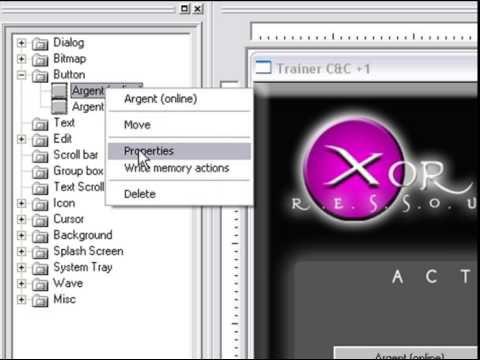
The following images show the step-by-step process for creating a trainer with TMK:
What is Trainer Spy? Trainer Spy is a utility that allows you to see which values are modified by a trainer in a program. This is useful for understanding how existing trainers work.
Ethics Notice
It is frowned upon in the trainer community to copy values from other people's trainers to make your own. This tool is meant for learning and understanding how trainers work, not for stealing others' work.
Launch all programs
Start the game, the trainer you want to analyze, and Trainer Spy. In Trainer Spy, click the play button (small arrow) to start monitoring.
Use the trainer
When you activate cheats with the trainer, you'll see the green bar increase and the "Nbr chain(s) write in memory" counter change.
View the captured values
Press pause to see the captured values in hexadecimal (base 16). These are the values used by the trainer that you could use with Trainer Maker Kit.
Trainer Spy is available in the Tools section of the site.
Winsock Packet Editor (WPE)
Tutorial by Rodre
This tutorial explains how to use Winsock Packet Editor (WPE) to intercept and modify network packets in online games. We'll use Helbreath as an example. Note that not all modifications will work, as server-side validation may reject changes.
Select the game process
Launch WPE and click on "Select Game" menu. Choose the game process (helgame).
Configure options
In Filter options, set maximum values. Check "Special mode", set packet trace to 256 or 128, and Winsock to version 2.
Start packet trace
Go to a merchant in-game, start the "Trace" function in WPE, then sell an item (e.g., a dagger for 12 gold = 0C in hex).
Analyze and find gold value
Stop the trace and search for "Gold" in the captured packets. You'll find the gold value that can be modified using the Filter.
Create the filter
In the Filter menu, copy the search string from the captured packet. At offset 28 (where 0C = 12 gold is), replace with FF (255 gold). Enable the filter to apply changes automatically.
Once you have your filter working, you can save it and use WPE's Trainer Maker feature to create a standalone trainer:
This is an example and does not work on Helbreath. Server-side validation prevents most modifications. Download WPE here.
TSearch - Delta Force Black Hawk Down
Tutorial by hErectus
This advanced tutorial teaches you how to use TSearch to find dynamic memory addresses in multiplayer games. Delta Force Black Hawk Down changes memory locations each time, making traditional trainers impossible - but we can still cheat!
Why dynamic addresses?
Some games randomize memory addresses to prevent cheating. We need to find values in real-time rather than using fixed addresses.
Setup: Host a solo game
Create a multiplayer game with: Server Type = "Serve and Play", Max Players = 1, Map = TDMM_01a. This way you're the server and can cheat!
Open TSearch and attach to game
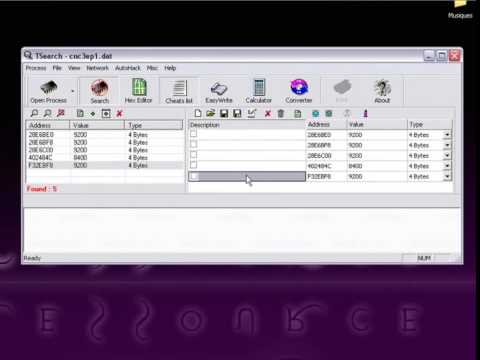
Press ALT+TAB to switch to TSearch. Click "Open Process" and select the game. You start with 100% health (shown as "100" then a green bar then "Damage").
First search: value 100
Click "Init new search", set: Search = Exact Value, Value = 100, Type = 1 Byte (since 100 is between 0-255). Click OK.
Damage yourself and search again
Throw a grenade near yourself (don't die!). Check your new health (e.g., 71%). Use "Search Next" with new value. Repeat until only 2 addresses remain.
Test and freeze the value
Double-click addresses to add to Cheats List. Change value to 100 and check the freeze box (blue smiley). Change Type to 4 Bytes and set value to 5000 for god mode!
The process is similar for ammo. Close everything, restart, and search for the pistol's 7 bullets:
Search for 7 (1 Byte), shoot once, search for 6, repeat until you find the address.
Test by changing values: set one address to 7 and the other to 2 to identify which is correct.
Set to 10 and freeze - you can now see bullets floating outside the magazine!
Download TSearch from the Tools section or directly: TSearch 1.6
C++ Trainer Programming
Tutorial by NiCk.Ø
This comprehensive 3-part tutorial teaches you how to create a trainer from scratch using C++. We'll use Tom Clancy's H.A.W.X as our target game. You'll learn to find memory addresses with TSearch, understand how trainers work, and write the actual code.
Introduction
C++ is a programming language. Every program, including games, is coded in some language. Trainers work by modifying variables in the game's memory.
To illustrate: H.A.W.X at the profile selection screen contains roughly 360,594,088 variables! Finding the right one is like finding a needle in a haystack - that's why we use tools like TSearch.
Prerequisites
Basic C++ knowledge (includes, cout, functions, namespaces)
Finding addresses takes 90% of trainer creation time! Let's find the missile count in H.A.W.X:
Start a mission
Create a profile, start the first mission. You have 240 Jstrike missiles. Press ESC before switching to TSearch!
First search
In TSearch: Process > Open > HAWX.exe. Search for 240, Type = 4 Bytes. Found ~25,000 results!
Narrow down
Fire 2 missiles (238 left). Use second magnifier, search 238. Down to 2 values!
Find the right address
Click green arrow to copy to Cheats List. Freeze one (checkbox = blue smiley), fire missiles. If count drops, try the other.
Use AutoHack
Enable debugger (AutoHack > Enable debugger), open AutoHack window. Click skull icon on your address, fire a missile. Two lines appear - we want the "add" instruction, not "mov".
Get the patch data
Select the correct line, click Tmk > Button Script. You get:
Save these values! They're essential for the code.
How the Trainer Works
Wait for game to open
Open memory access
If access fails → stop with error
Try to read memory
If read works → try to write
Loop: check if value changed, rewrite if needed, continue while game runs
The Code
Create a new Win32 Console Application in Visual C++, add a main.cpp file:
#include <iostream>
#include <windows.h>

using namespace std;

int main()
{
    LPCTSTR Titrefenetre = (L"Tom Clancy's H.A.W.X");
    HWND Handlefenetre = 0;
    BYTE patch[] = "\x90\x90\x90";
    int Adressememoire = 0x7C8F77;
    DWORD Pid = 0;
    int Valeurlue = 0;
    HANDLE Handleprocess = 0;

    SetConsoleTitleA("Tom Clancy's H.A.W.X V 1.02 trainer");
    cout << "Launching trainer..." << endl;
    cout << "Waiting for game..." << endl;

    // Wait for game window
    do {
        Sleep(500);
        Handlefenetre = FindWindow(0, Titrefenetre);
    } while (Handlefenetre == NULL);

    cout << "Window found!" << endl;

    // Get process ID
    GetWindowThreadProcessId(Handlefenetre, &Pid);

    // Open process with read/write access
    Handleprocess = OpenProcess(0x10+0x20+0x8, true, Pid);

    if (Handleprocess == NULL) {
        cout << "Error opening process: " << GetLastError() << endl;
        system("pause");
        return 0;
    }

    cout << "Process opened!" << endl;

    // Verify memory address (check for correct game version)
    if ((ReadProcessMemory(Handleprocess,
         reinterpret_cast(Adressememoire),
         &Valeurlue, 3, 0) != 0) && (Valeurlue == 0x286e01))
    {
        cout << "Memory readable!" << endl;
    } else {
        cout << "Error: Wrong game version or trainer already running" << endl;
        system("pause");
        return 0;
    }

    // Write patch
    if (WriteProcessMemory(Handleprocess,
        reinterpret_cast(Adressememoire),
        &patch, sizeof(patch), 0) != 0)
    {
        cout << "Injection successful!" << endl;
    } else {
        cout << "Injection failed: " << GetLastError() << endl;
        system("pause");
        return 0;
    }

    // Monitor and maintain patch
    do {
        ReadProcessMemory(Handleprocess,
            reinterpret_cast(Adressememoire),
            &Valeurlue, 3, 0);

        if (Valeurlue != 0x909090) {
            cout << "Value changed, reinjecting..." << endl;
            if (WriteProcessMemory(Handleprocess,
                reinterpret_cast(Adressememoire),
                &patch, sizeof(patch), 0) != 0)
            {
                cout << "Reinjection successful!" << endl;
            } else {
                cout << "Reinjection failed" << endl;
                system("pause");
                return 0;
            }
        }
        Sleep(500);
    } while (FindWindow(0, Titrefenetre) == Handlefenetre);

    cout << "Game closed. Stopping trainer..." << endl;
    CloseHandle(Handleprocess);
    system("PAUSE");
    return 0;
}
Key Functions Used
FindWindow() - Find game window by title
GetWindowThreadProcessId() - Get process ID
OpenProcess() - Open process with access rights
ReadProcessMemory() - Read from game memory
WriteProcessMemory() - Write to game memory
Game Hacking with Dead Space
Tutorial by Xylitol - Updated May 2021
This modern tutorial covers complete game reverse engineering using Dead Space v1.0.0.222. You'll learn to use Cheat Engine, OllyDbg, create codecaves, and build a functional trainer in assembly.
Dead Space v1.0.0.222 (tested with RELOADED release)
Launch Dead Space and Cheat Engine. In CE, select the Dead Space process.
Search for your current ammo count (e.g., 10). After shooting, search for new value. Repeat until one address remains.
Change the value to 1337 to verify it's the correct address.
Right-click the address → "Find out what accesses this address". This attaches the debugger and shows which instructions read/write the value.
Key finding: 004F9101 - mov ecx,[eax+00000684] constantly reads the ammo value.
What's a codecave? In game hacking, we often need to add code rather than just replace it. A codecave redirects execution to empty memory space where we have room for our modifications, then returns.
In OllyDbg, find empty space (search for zeros). I chose 011F631D.
At 004F9101, replace the original instruction with a JMP to our codecave.
In the codecave, write:
MOV DWORD PTR DS:[EAX+684],539 ; Set ammo to 1337
MOV ECX,DWORD PTR DS:[EAX+684] ; Original instruction
JMP 004F9107 ; Return
Result: Unlimited ammo!
Health is typically stored as a float. We don't know the exact value, but assume full health = 100.
Search for 100 as Float. Take damage, search "Decreased value". Heal, search "Increased value". Repeat until you find the address.