Need for Speed: Undercover Save Game – PC

Select your platform and your letter

Need for Speed: Undercover Save Game

Need for Speed: Undercover Save Game: free file for Need for Speed: Undercover on PC, to copy into the game's save folder. Updated March 5, 2024 · 1,569 downloads.

PC
Need for Speed: Undercover cover
Advertisement
REQUIRED CONDITIONS
This box must be checked to enable download.
5 seconds before download...
File: Need.for.Speed.Undercover.Cosplay.Famous.Auto.3.save.game.zip
402.97 KB SHA-1: 76ff1211…ddd7bcee
Information
  • Author: KSA
  • Downloads: 1,569
  • Updated:
  • Size: 402.97 KB
  • SHA-1: 76ff121120ce4d42dd380357f1dd0bf1ddd7bcee

Cheat Codes

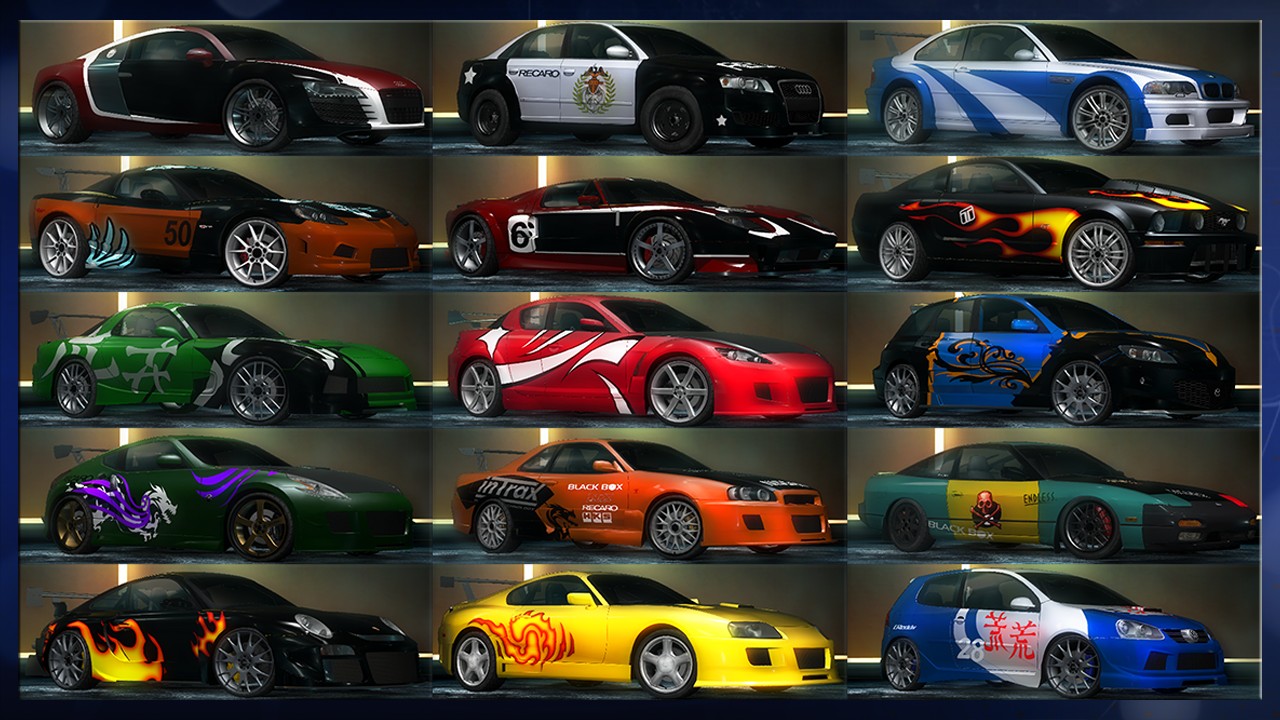
Cosplay of famous cars

Cosplay from original styling parts for famous cars from the Need for Speed game series

Created in game version 1.0.1.17

Cosplay on:

Audi Le Mans Quattro - Darius's car from NFS Carbon (2006)
Police Civic Cruiser - police car from the NFS series (2005-2008)
BMW M3 GTR GT (E46) - GG's (later Razor's) car from NFS Most Wanted (2005)
Chevrolet Corvette (C6) - Webster's car from NFS Most Wanted (2005)
Ford GT - Nikki's car from NFS Carbon (2006)
Ford Mustang GT - Razor's car from NFS Most Wanted (2005)
Mazda RX-7 - Kenji's car from NFS Carbon (2006)
Mazda RX-8 - Mia's car from NFS Most Wanted (2005)
Mazda Mazdaspeed3 - Neville's car from NFS Carbon (2006)
Nissan 350Z - Rachel Teller's car from NFS Underground 2 (2004)
Nissan Skyline GT-R (R34) V-Spec - Eddie's car from NFS Underground (2003)
Nissan 240SX - Ryan Cooper's car from NFS ProStreet (2007)
Porsche Cayman S - Baron's car from NFS Most Wanted (2005)
Toyota Supra - Ronnie's car from NFS Most Wanted (2005)
Volkswagen Golf GTI - Sonny's car from NFS Most Wanted (2005)

Archive Images

81097949.jpg
Click on an image to enlarge it

Information Files (.nfo)

Name of the file: Trainers.nfo


█▓▓▓▓▓▓▓▓▓▓▓▓▓▓▓▓▓▓▓▓▓▓▓▓▓▓▓▓▓▓▓▓▓▓▓▓▓▓▓▓▓▓▓▓▓▓▓▓▓▓▓▓▓▓▓▓▓▓▓▓▓▓▓▓▓▓▓▓▓▓▓▓▓▓▓█ █▓▒▒▒▓█████▓█████▓█████▓█▓█▓▓▓█▓█████▓█████▓█████▓▓▓▓████▓█▓█████▓█▓▓▓█▓▒▒▒▓█ █▓▒ ▓▓▓█▓▓▓█▓▓▓█▓█▓▓▓█▓█▓██▓▓█▓█▓▓▓▓▓█▓▓▓█▓█▓▓▓▓▓▓▓▓█▓▓▓▓█▓▓▓█▓▓▓▓█▓█▓▓ ▒▓█ █▓ ▓▓▓█▓▓▓█████▓█████▓█▓█▓█▓█▓████▓▓█████▓█████▓██▓█▓▓▓▓█▓▓▓█▓▓▓▓▓█▓▓▓ ▓█ █▓▒ ▓▓▓█▓▓▓█▓▓█▓▓█▓▓▓█▓█▓█▓▓██▓█▓▓▓▓▓█▓▓█▓▓▓▓▓▓█▓▓▓▓█▓▓▓▓█▓▓▓█▓▓▓▓▓█▓▓▓ ▒▓█ █▓▒▒▒▓▓▓█▓▓▓█▓▓▓█▓█▓▓▓█▓█▓█▓▓▓█▓█████▓█▓▓▓█▓█████▓▓▓▓████▓█▓▓▓█▓▓▓▓▓█▓▓▓▒▒▒▓█ █▓▓▓▓▓▓▓▓▓▓▓▓▓▓▓▓▓▓▓▓▓▓▓▓▓▓▓▓▓▓▓▓▓▓▓▓▓▓▓▓▓▓▓▓▓▓▓▓▓▓▓▓▓▓▓▓▓▓▓▓▓▓▓▓▓▓▓▓▓▓▓▓▓▓▓█ █▓▓▓▓░░░ Trainers City ░░░▓▓▓▓▓█ █▓▒▒▒ - The Bible Trainers - ▒▒▒▓█ █ ■■■■■■■■■■ ■■■■■■■■■■ █ █ █ █ This trainer doesn't work with your game? █ █ Read the FAQ or write to the author! █ █ https://www.trainerscity.com/en/help (In English) █ █ https://www.trainerscity.com/fr/help (In French) █ █ █ █ ■■■■■■■■■■ ■■■■■■■■■■ █ █ █ █ Try the forums of Trainers City in French and......

...You will find the rest of this information in: Trainers.nfo,
if you download this file: Need.for.Speed.Undercover.Cosplay.Famous.Auto.3.save.game.zip
Trainers City

How to install the Need for Speed: Undercover Save Game save game

This Need for Speed: Undercover Save Game save file is a pre-advanced game progress file that you copy into the game's save folder. Back up your existing save file first — so you can restore it if needed. Then locate the game's save directory (usually under Documents/My Games/ or %APPDATA% on Windows) and replace the existing file with the one provided in the archive. Restart the game and load the save from the save selection menu.

FAQ

Yes, always. Copy your existing save file to a safe location before replacing it — if the downloaded save doesn't suit you, you can restore yours in seconds.

The location varies by game, but the most common paths on Windows are: Documents\My Games\[GameName]\, %APPDATA%\[GameName]\, or %LOCALAPPDATA%\[GameName]\. For Steam games, saves may also be stored in Steam\userdata\[SteamID]\[AppID]\remote\.

Make sure you copied the file to the correct folder and that the file name exactly matches the format the game expects (no double extension, e.g. .sav.sav). Some games also require the slot number to match an existing save slot.

Save files are usually compatible across versions of the same game, unless a major update changed the save format. If the game refuses to load the file, check that your game version matches the one noted in the description.
Still not working? Visit our help page for further assistance.
Comments
Become a Patron!
Comments only in English or French or comments will be removed!

Add Comment

* Required information
1000
Powered by Commentics

Comments

No comments yet. Be the first!


Become a Patron!