Into the Breach v1.2.24 Trainer +10 – PC

Select your platform and your letter

Into the Breach v1.2.24 Trainer +10

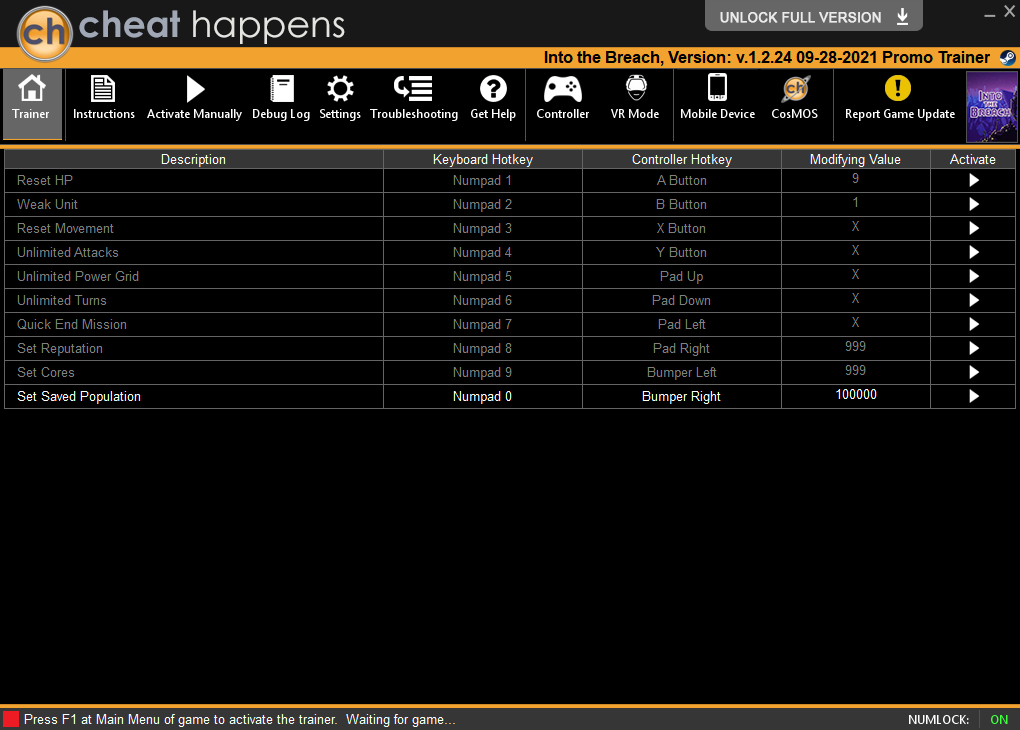
Into the Breach v1.2.24 Trainer +10 is a free PC trainer for Into the Breach (game version v1.2.24), made by Cheat Happens. It adds 10 cheat options, listed below. Updated October 1, 2021 · 2,738 downloads · single-player use only.

PC
REQUIRED CONDITIONS
This box must be checked to enable download.
5 seconds before download...
File: intobreachp9ch.zip
753.83 KB SHA-1: 20e6cdf3…3bbf052f
Information
  • Author: CHA
  • Downloads: 2,738
  • Updated:
  • Size: 753.83 KB
  • SHA-1: 20e6cdf3d9d9752b8cb422c8056e6ca13bbf052f
Full Version

Unlock more options and updates in the complete trainer of Into the Breach Trainer at Cheat Happens!

Archive Images

screenshot-2021-10-01.png
Click on an image to enlarge it

Text Files (.txt)

Trainer Notes.txt
Trainer Options ------------------------------------------------------------------------------------------------------------------------------ Numpad 1: Reset HP Numpad 2: Weak Unit Numpad 3: Reset Movement Numpad 4: Unlimited Attacks Numpad 5: Unlimited Power Grid Numpad 6: Unlimited Turns Numpad 7: Quick End Mission Numpad 8: Set Reputation Numpad 9: Set Cores Numpad 0: Set Saved Population Notes ------------------------------------------------------------------------------------------------------------------------------ Numpad 1: Reset HP - select the unit you wish to affect, including most enemies, and press this to affect it. The number in the trainer is what the HP is set to. Probably best to not use number larger than 9. Numpad 2: Weak Unit - select the unit you wish to affect, including most enemies, and press this to affect it. The number in the trainer is what the HP is set to, but generally 1 is the lowest you should go and this makes the enemy have 1 HP. Numpad 3: Reset Movement - toggle this on and once you move a unit, click another unit, then click back to the original unit and you can move it over and over in this fashion. Numpad 4: Unlimited Attacks - toggle this on and when you attack, the unit can then attack over and over. Numpad 5: Unlimited Power Grid - toggle this on to reset your power grid to the max amount. Numpad 6: Unlimited Turns - toggle this on and your turns will not decrease. ......


...You will find the rest of this information in: Trainer Notes.txt
if you download this file: intobreachp9ch.zip
Trainers City

Information Files (.nfo)

Name of the file: Trainers.nfo


█▓▓▓▓▓▓▓▓▓▓▓▓▓▓▓▓▓▓▓▓▓▓▓▓▓▓▓▓▓▓▓▓▓▓▓▓▓▓▓▓▓▓▓▓▓▓▓▓▓▓▓▓▓▓▓▓▓▓▓▓▓▓▓▓▓▓▓▓▓▓▓▓▓▓▓█ █▓▒▒▒▓█████▓█████▓█████▓█▓█▓▓▓█▓█████▓█████▓█████▓▓▓▓████▓█▓█████▓█▓▓▓█▓▒▒▒▓█ █▓▒ ▓▓▓█▓▓▓█▓▓▓█▓█▓▓▓█▓█▓██▓▓█▓█▓▓▓▓▓█▓▓▓█▓█▓▓▓▓▓▓▓▓█▓▓▓▓█▓▓▓█▓▓▓▓█▓█▓▓ ▒▓█ █▓ ▓▓▓█▓▓▓█████▓█████▓█▓█▓█▓█▓████▓▓█████▓█████▓██▓█▓▓▓▓█▓▓▓█▓▓▓▓▓█▓▓▓ ▓█ █▓▒ ▓▓▓█▓▓▓█▓▓█▓▓█▓▓▓█▓█▓█▓▓██▓█▓▓▓▓▓█▓▓█▓▓▓▓▓▓█▓▓▓▓█▓▓▓▓█▓▓▓█▓▓▓▓▓█▓▓▓ ▒▓█ █▓▒▒▒▓▓▓█▓▓▓█▓▓▓█▓█▓▓▓█▓█▓█▓▓▓█▓█████▓█▓▓▓█▓█████▓▓▓▓████▓█▓▓▓█▓▓▓▓▓█▓▓▓▒▒▒▓█ █▓▓▓▓▓▓▓▓▓▓▓▓▓▓▓▓▓▓▓▓▓▓▓▓▓▓▓▓▓▓▓▓▓▓▓▓▓▓▓▓▓▓▓▓▓▓▓▓▓▓▓▓▓▓▓▓▓▓▓▓▓▓▓▓▓▓▓▓▓▓▓▓▓▓▓█ █▓▓▓▓░░░ Trainers City ░░░▓▓▓▓▓█ █▓▒▒▒ - The Bible Trainers - ▒▒▒▓█ █ ■■■■■■■■■■ ■■■■■■■■■■ █ █ █ █ This trainer doesn't work with your game? █ █ Read the FAQ or write to the author! █ █ https://www.trainerscity.com/en/help (In English) █ █ https://www.trainerscity.com/fr/help (In French) █ █ █ █ ■■■■■■■■■■ ■■■■■■■■■■ █ █ █ █ Try the forums of Trainers City in French and......

...You will find the rest of this information in: Trainers.nfo,
if you download this file: intobreachp9ch.zip
Trainers City


How to use this trainer for Into the Breach v1.2.24 Trainer +10

To activate the Into the Breach v1.2.24 Trainer +10 trainer, start your game first. Once in-game (main menu or in a session), run the trainer file as Administrator (right-click → Run as Administrator). The trainer control panel opens: each option (infinite health, unlimited ammo, resources, etc.) is toggled with the keyboard hotkey shown. If the trainer doesn't connect to the game, try launching it before the game, or verify that your game version matches the one specified in the file name.

FAQ

No, this is a common false positive. PC trainers work by injecting code into the game's memory, which looks technically similar to malware behavior. Every file published on Trainers City is manually verified before release. If in doubt, check our Virus Alert page.

Make sure your game version matches exactly what's mentioned in the trainer's file name (e.g., v1.0, Steam, Epic Games). If your build is different, search for a trainer matching your specific version in the full platform list.

It depends on the trainer. The general rule: launch the game to the main menu first, then the trainer. If the trainer doesn't connect, try the opposite. The .nfo file included in the archive often specifies the recommended order.

It depends on the game. Some games detect memory modifications and disable achievements automatically. To preserve your achievements, save before using the trainer and avoid saving afterwards.
Still not working? Visit our help page for further assistance.
Comments
Become a Patron!
Comments only in English or French or comments will be removed!


Become a Patron!