Nioh : Complete Edition v1.21 Trainer +17 – PC

Select your platform and your letter

Nioh : Complete Edition v1.21 Trainer +17

Nioh : Complete Edition v1.21 Trainer +17 is a free PC trainer for Nioh : Complete Edition (game version v1.21), made by FUT. It adds 17 cheat options, listed below. Updated November 17, 2017 · 9,221 downloads · single-player use only.

PC
REQUIRED CONDITIONS
This box must be checked to enable download.
5 seconds before download...
File: NIOH.CE.V1.21.PLUS17TRN.FUTUREX.ZIP
4.57 MB SHA-1: 2ea10230…846f9328
Information
  • Author: FUT
  • Downloads: 9,221
  • Updated:
  • Size: 4.57 MB
  • SHA-1: 2ea10230315ccebca9622288c49f7a97846f9328

Archive Images

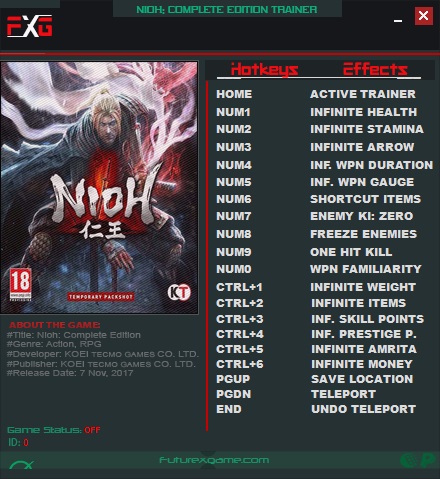
Nioh Complete Edition v1.21 +17 Trainer.jpg
Click on an image to enlarge it

Text Files (.txt)

Readme.txt
[x64-64Bit] Nioh: Complete Edition v1.21 +17 Trainer ___Hotkeys & Effects____ HOME Active Trainer Numpad1 Infinite Health Numpad2 Infinite Stamina Numpad3 Infinite Arrow Numpad4 Infinite Weapon Duration Numpad5 Infinite Weapon Gauge Numpad6 Infinite Shortcut Items Numpad7 Enemy Ki: Zero (Can't attack) Numpad8 Freeze All Enemies (Can't move) Numpad9 One Hit Kill Numpad0 Max Weapon Familiarity Ctrl+Number1 Infinite Weight Ctrl+Number2 Infinite Items Ctrl+Number3 Infinite Skill Points Ctrl+Number4 Infinite Prestige Points Ctrl+Number5 Infinite Amrita Ctrl+Number6 Infinite Money Teleport: PageUp Save Location PageDown Teleport End Undo Teleport Enjoy! Important: /**/ Must be installed "Microsoft C++ 2015 Redistributable Packets". /**/ https://www.microsoft.com/en-US/download/details.aspx?id=48145 ________________________________ Nioh Complete Edition-CODEX Title: Nioh: Complete Edition / ?? Complete Edition Genre: Action, RPG Developer: KOEI TECMO GAMES CO., LTD. Publisher: KOEI TECMO GAMES CO., LTD. Release Date: 7 Nov, 2017 ________________________________ Uploaded by FutureX http://futurexgame.com _________________________________


...You will find the rest of this information in: Readme.txt
if you download this file: NIOH.CE.V1.21.PLUS17TRN.FUTUREX.ZIP
Trainers City

Information Files (.nfo)

Name of the file: Trainers.nfo


█▓▓▓▓▓▓▓▓▓▓▓▓▓▓▓▓▓▓▓▓▓▓▓▓▓▓▓▓▓▓▓▓▓▓▓▓▓▓▓▓▓▓▓▓▓▓▓▓▓▓▓▓▓▓▓▓▓▓▓▓▓▓▓▓▓▓▓▓▓▓▓▓▓▓▓█ █▓▒▒▒▓█████▓█████▓█████▓█▓█▓▓▓█▓█████▓█████▓█████▓▓▓▓████▓█▓█████▓█▓▓▓█▓▒▒▒▓█ █▓▒ ▓▓▓█▓▓▓█▓▓▓█▓█▓▓▓█▓█▓██▓▓█▓█▓▓▓▓▓█▓▓▓█▓█▓▓▓▓▓▓▓▓█▓▓▓▓█▓▓▓█▓▓▓▓█▓█▓▓ ▒▓█ █▓ ▓▓▓█▓▓▓█████▓█████▓█▓█▓█▓█▓████▓▓█████▓█████▓██▓█▓▓▓▓█▓▓▓█▓▓▓▓▓█▓▓▓ ▓█ █▓▒ ▓▓▓█▓▓▓█▓▓█▓▓█▓▓▓█▓█▓█▓▓██▓█▓▓▓▓▓█▓▓█▓▓▓▓▓▓█▓▓▓▓█▓▓▓▓█▓▓▓█▓▓▓▓▓█▓▓▓ ▒▓█ █▓▒▒▒▓▓▓█▓▓▓█▓▓▓█▓█▓▓▓█▓█▓█▓▓▓█▓█████▓█▓▓▓█▓█████▓▓▓▓████▓█▓▓▓█▓▓▓▓▓█▓▓▓▒▒▒▓█ █▓▓▓▓▓▓▓▓▓▓▓▓▓▓▓▓▓▓▓▓▓▓▓▓▓▓▓▓▓▓▓▓▓▓▓▓▓▓▓▓▓▓▓▓▓▓▓▓▓▓▓▓▓▓▓▓▓▓▓▓▓▓▓▓▓▓▓▓▓▓▓▓▓▓▓█ █▓▓▓▓░░░ Trainers City ░░░▓▓▓▓▓█ █▓▒▒▒ - The Bible Trainers - ▒▒▒▓█ █ ■■■■■■■■■■ ■■■■■■■■■■ █ █ █ █ This trainer doesn't work with your game? █ █ Read the FAQ or write to the author! █ █ https://www.trainerscity.com/en/help (In English) █ █ https://www.trainerscity.com/fr/help (In French) █ █ █ █ ■■■■■■■■■■ ■■■■■■■■■■ █ █ █ █ Try the forums of Trainers City in French and......

...You will find the rest of this information in: Trainers.nfo,
if you download this file: NIOH.CE.V1.21.PLUS17TRN.FUTUREX.ZIP
Trainers City

How to use this trainer for Nioh : Complete Edition v1.21 Trainer +17

To activate the Nioh : Complete Edition v1.21 Trainer +17 trainer, start your game first. Once in-game (main menu or in a session), run the trainer file as Administrator (right-click → Run as Administrator). The trainer control panel opens: each option (infinite health, unlimited ammo, resources, etc.) is toggled with the keyboard hotkey shown. If the trainer doesn't connect to the game, try launching it before the game, or verify that your game version matches the one specified in the file name.

FAQ

No, this is a common false positive. PC trainers work by injecting code into the game's memory, which looks technically similar to malware behavior. Every file published on Trainers City is manually verified before release. If in doubt, check our Virus Alert page.
Make sure your game version matches exactly what's mentioned in the trainer's file name (e.g., v1.0, Steam, Epic Games). If your build is different, search for a trainer matching your specific version in the full platform list.

It depends on the trainer. The general rule: launch the game to the main menu first, then the trainer. If the trainer doesn't connect, try the opposite. The .nfo file included in the archive often specifies the recommended order.

It depends on the game. Some games detect memory modifications and disable achievements automatically. To preserve your achievements, save before using the trainer and avoid saving afterwards.
Still not working? Visit our help page for further assistance.
Comments
Become a Patron!
Comments only in English or French or comments will be removed!


Become a Patron!