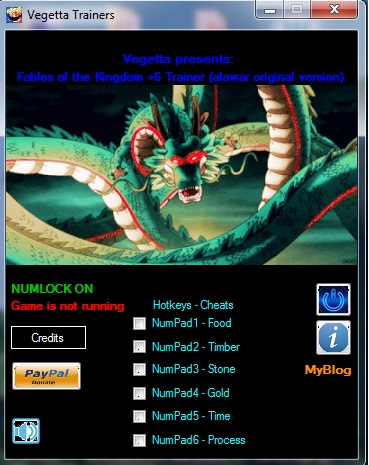
Fables of The Kingdom Trainer +6 – PC

Sélectionnez votre plateforme et votre lettre

Fables of The Kingdom Trainer +6

Fables of The Kingdom Trainer +6 est un trainer PC gratuit pour Fables of The Kingdom, créé par CHU. Il ajoute 6 options de triche, détaillées ci-dessous. Mis à jour le 27 octobre 2015 · 4 400 téléchargements · usage solo uniquement.

PC
CONDITIONS REQUISES
Cette case doit être cochée pour activer le téléchargement.
5 secondes avant le téléchargement...
Fichier : Fables.of.the.Kingdom.zip
2.27 MB SHA-1: da469568…19a16a92
Informations
  • Auteur : CHU
  • Téléchargements : 4,400
  • Mise à jour :
  • Taille : 2.27 MB
  • SHA-1: da46956823a180e93583be782d1fc57619a16a92

Images de l'archive
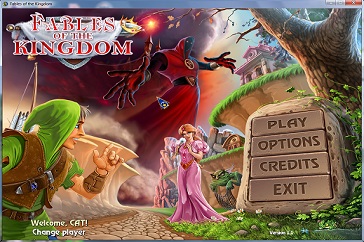
Fables_Kingdom- Screenshot.jpg
Fables_Kingdom- TrainerScreenshot.jpg
Cliquez sur une image pour l'agrandir

Fichiers d'information (.nfo)

Nom du fichier : Fables of the Kingdom/Readme.nfo


---------PC GAME / FABLES OF THE KINGDOM original version. Downloaded and tested with Alawar version (www.alawar.com). ---------TRAINER ( +6 OPTIONS) ---------Designed by CHU Vegetta. ---------Trainer tested in Win XP (32-bit) and Win 7 (32-bit) ---------Date: 20-October-2015 [REQUIREMENTS] Install .NET FRAMEWORK 4.0 or above 1) How to use trainer: - Start the game - Start a level and play for a while. - Press the windows keyboard button or alt+tab to minimize the game window. - Start the trainer-->veg-fabkin_trn.exe and return to the game. - Press the hotkeys to enable cheats (use the Hotkeys or check the CheckBoxes) 2) How to close the trainer and quit the game: - Disable the cheats (uncheck the CheckBoxes) - Close the trainer - Quit the game 3) -----IMPORTANT NOTES----- A) Make a backup of your saved game before you use the trainer and save the game regularly B) Disable your antivirus/firewall before you run the trainer, otherwise it may block its function C) You may need to run the trainer as Administrator D) Trainer may work with other versions too (i.e bigfish etc). Rename the executable file to "kingdom.wrp.exe" without quotation mark and test it. 4) Hotkeys: Enable NumLock keyboard button You may need to hit them twice to cheat or/and anytime you start a new level. NumPad1: Get 1.000 Food (Freezed value) NumPad2: Get 1.000 Timber (Freezed value) NumPad3: Get 1.000 ......

...Vous trouverez le reste de ces informations dans : Fables of the Kingdom/Readme.nfo,
si vous téléchargez ce fichier : Fables.of.the.Kingdom.zip
Trainers City

Nom du fichier : Trainers.nfo


█▓▓▓▓▓▓▓▓▓▓▓▓▓▓▓▓▓▓▓▓▓▓▓▓▓▓▓▓▓▓▓▓▓▓▓▓▓▓▓▓▓▓▓▓▓▓▓▓▓▓▓▓▓▓▓▓▓▓▓▓▓▓▓▓▓▓▓▓▓▓▓▓▓▓▓█ █▓▒▒▒▓█████▓█████▓█████▓█▓█▓▓▓█▓█████▓█████▓█████▓▓▓▓████▓█▓█████▓█▓▓▓█▓▒▒▒▓█ █▓▒ ▓▓▓█▓▓▓█▓▓▓█▓█▓▓▓█▓█▓██▓▓█▓█▓▓▓▓▓█▓▓▓█▓█▓▓▓▓▓▓▓▓█▓▓▓▓█▓▓▓█▓▓▓▓█▓█▓▓ ▒▓█ █▓ ▓▓▓█▓▓▓█████▓█████▓█▓█▓█▓█▓████▓▓█████▓█████▓██▓█▓▓▓▓█▓▓▓█▓▓▓▓▓█▓▓▓ ▓█ █▓▒ ▓▓▓█▓▓▓█▓▓█▓▓█▓▓▓█▓█▓█▓▓██▓█▓▓▓▓▓█▓▓█▓▓▓▓▓▓█▓▓▓▓█▓▓▓▓█▓▓▓█▓▓▓▓▓█▓▓▓ ▒▓█ █▓▒▒▒▓▓▓█▓▓▓█▓▓▓█▓█▓▓▓█▓█▓█▓▓▓█▓█████▓█▓▓▓█▓█████▓▓▓▓████▓█▓▓▓█▓▓▓▓▓█▓▓▓▒▒▒▓█ █▓▓▓▓▓▓▓▓▓▓▓▓▓▓▓▓▓▓▓▓▓▓▓▓▓▓▓▓▓▓▓▓▓▓▓▓▓▓▓▓▓▓▓▓▓▓▓▓▓▓▓▓▓▓▓▓▓▓▓▓▓▓▓▓▓▓▓▓▓▓▓▓▓▓▓█ █▓▓▓▓░░░ Trainers City ░░░▓▓▓▓▓█ █▓▒▒▒ - The Bible Trainers - ▒▒▒▓█ █ ■■■■■■■■■■ ■■■■■■■■■■ █ █ █ █ This trainer doesn't work with your game? █ █ Read the FAQ or write to the author! █ █ https://www.trainerscity.com/en/help (In English) █ █ https://www.trainerscity.com/fr/help (In French) █ █ █ █ ■■■■■■■■■■ ■■■■■■■■■■ █ █ █ █ Try the forums of Trainers City in French and......

...Vous trouverez le reste de ces informations dans : Trainers.nfo,
si vous téléchargez ce fichier : Fables.of.the.Kingdom.zip
Trainers City

Comment utiliser ce trainer pour Fables of The Kingdom Trainer +6

Pour activer le trainer Fables of The Kingdom Trainer +6, commencez par lancer le jeu. Une fois en jeu (menu principal ou en partie), exécutez le fichier trainer en tant qu'administrateur (clic droit → Exécuter en tant qu'administrateur). La fenêtre de contrôle du trainer s'ouvre : chaque option (vie infinie, munitions illimitées, ressources, etc.) s'active via la touche clavier indiquée. Si le trainer ne se connecte pas au jeu, essayez de le lancer avant le jeu, ou vérifiez que votre version correspond bien à celle indiquée dans le nom du fichier.

FAQ

Non, c'est un faux positif classique. Les trainers PC fonctionnent en injectant du code dans la mémoire du jeu, ce qui ressemble techniquement à un comportement de malware. Chaque fichier publié sur Trainers City est vérifié manuellement avant mise en ligne. En cas de doute, consultez notre page Alerte Virus.

Vérifiez que votre version du jeu correspond exactement à celle mentionnée dans le nom du trainer (ex. v1.0, Steam, Epic Games). Si votre build est différent, recherchez un trainer correspondant à votre version dans la liste complète de la plateforme.

Cela dépend du trainer. La règle générale : lancez d'abord le jeu jusqu'au menu principal, puis le trainer. Si le trainer ne se connecte pas, essayez l'inverse. Le fichier .nfo inclus dans l'archive précise souvent l'ordre recommandé.

Cela dépend du jeu. Certains jeux détectent les modifications mémoire et désactivent les succès automatiquement. Pour préserver vos achievements, sauvegardez avant d'utiliser le trainer et évitez de sauvegarder après.
Ça ne fonctionne toujours pas ? Consultez notre page d'aide pour plus d'assistance.
Commentaires
Become a Patron!
Commentaires uniquement en anglais ou en français ou vos commentaires seront supprimés !


Become a Patron!